App Profile: PDF Converter: PDF to PNG
Android / Games / Puzzles
PDF Converter: PDF to PNG
Installs:
Rating:
3.86
Total Reviews:
7
Top Countries:
NG, VN, FR
< $5k
/mo
< 5k
/mo
Reviews: What People Think About PDF Converter: PDF to PNG
About PDF Converter: PDF to PNG
Convert all pages in a PDF to Image or extract all images in a PDF to PNG. Convert or extract PDF to PNG offline, easily with just a single click.
You can easily convert PDF to PNG or Images to PDF using a short time.
All the pages will be converted into image files and zipped into a single folder.
All the PNG images can be saved in one go as saved Photos.
The PNG images generated by our app are of high quality.
Steps to use PDF to PNG Converter
1. Select All PDF or Pick New PDF button
2 Select PDF file with + icon.
3. Click on Create button and show all converted images in the list.
4. View the newly created folder in the list.
5. View all images inside the new folder.
6. Share or delete the images by pressing the image/images in the image list.
7. It can be used offline.
Features:
- PDF To Images
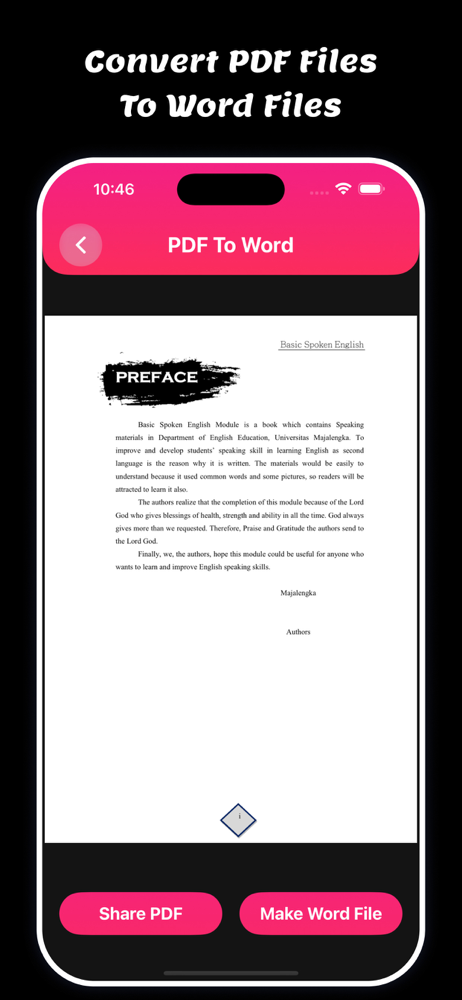
- PDF To Word
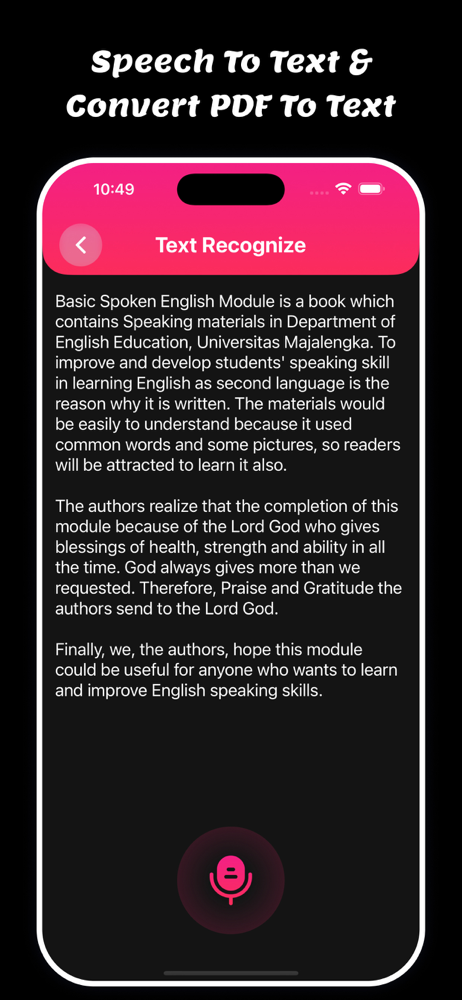
- PDF To Text
- Merge PDF
- OCR PDF
- Text Recognize
- Add Watermark
- Digital Signature
- PDF Page Remove
- Unlock PDF
- Lock PDF
- PDF Compress
- Images To PDF
- Web To PDF
- Edit PDF
PDF Converter: PDF to PNG app is used to make Text Recognize for make text pdf files.
PDF Converter: PDF to PNG app is used to OCR PDF for get all text from photos.
PDF Converter: PDF to PNG app is used to merge multiple files and save it.
PDF Converter: PDF to PNG app is used to PDF Page Remove and save new pdf files.
PDF Converter: PDF to PNG app is used to Lock & Unlock PDF files.
PDF Converter: PDF to PNG app is used to get text files from PDF files.
PDF Converter: PDF to PNG app is used to get all images from PDF Files.
Users can merge multiple PDF files using the PDF Converter app.
Users can compress files like high, medium, and low PDF Files using the PDF Converter app.
Users can show all downloaded PDF Files in saved Files using the PDF Converter app.
Users can print PDF files using the PDF Converter app.
Users can share and download all converted PDF Pages using the PDF Converter app.
Users can Export PDF Files to Document and RTF files using the PDF Converter app.
Users can add watermarks using text and logo in pdf files using the PDF Watermark app.
Users can add signatures using PDF Signature app.
Download and enjoy the PDF Converter: PDF to PNG.
Privacy Policy: https://glistensolution.com/Apps/App_Privacy.html
Terms of use: https://glistensolution.com/Apps/App_TOS.html
You can easily convert PDF to PNG or Images to PDF using a short time.
All the pages will be converted into image files and zipped into a single folder.
All the PNG images can be saved in one go as saved Photos.
The PNG images generated by our app are of high quality.
Steps to use PDF to PNG Converter
1. Select All PDF or Pick New PDF button
2 Select PDF file with + icon.
3. Click on Create button and show all converted images in the list.
4. View the newly created folder in the list.
5. View all images inside the new folder.
6. Share or delete the images by pressing the image/images in the image list.
7. It can be used offline.
Features:
- PDF To Images
- PDF To Word
- PDF To Text
- Merge PDF
- OCR PDF
- Text Recognize
- Add Watermark
- Digital Signature
- PDF Page Remove
- Unlock PDF
- Lock PDF
- PDF Compress
- Images To PDF
- Web To PDF
- Edit PDF
PDF Converter: PDF to PNG app is used to make Text Recognize for make text pdf files.
PDF Converter: PDF to PNG app is used to OCR PDF for get all text from photos.
PDF Converter: PDF to PNG app is used to merge multiple files and save it.
PDF Converter: PDF to PNG app is used to PDF Page Remove and save new pdf files.
PDF Converter: PDF to PNG app is used to Lock & Unlock PDF files.
PDF Converter: PDF to PNG app is used to get text files from PDF files.
PDF Converter: PDF to PNG app is used to get all images from PDF Files.
Users can merge multiple PDF files using the PDF Converter app.
Users can compress files like high, medium, and low PDF Files using the PDF Converter app.
Users can show all downloaded PDF Files in saved Files using the PDF Converter app.
Users can print PDF files using the PDF Converter app.
Users can share and download all converted PDF Pages using the PDF Converter app.
Users can Export PDF Files to Document and RTF files using the PDF Converter app.
Users can add watermarks using text and logo in pdf files using the PDF Watermark app.
Users can add signatures using PDF Signature app.
Download and enjoy the PDF Converter: PDF to PNG.
Privacy Policy: https://glistensolution.com/Apps/App_Privacy.html
Terms of use: https://glistensolution.com/Apps/App_TOS.html
File size: 32696320
Launched countries: USAUCACNFRDEGBITJPKRRUDZAOARATAZBHBBBYBEBMBRBGCLCOCRHRCYCZDKDOECEGSVFIGHGRGTHKHUINIDIEILKZKEKWLBLTLUMOMGMYMTMXNLNZNGNOOMPKPAPEPHPLPTQAROSARSSGSKSIZAESLKSECHTWTHTNTRUAAEUYUZVEVNBOKHEELVNIPYAFGEIQLYMAMZMMYEBJBFCMCGCIJOLAMLSNTZUGZMZW
Minimum OS version: 13.0
Release Date: 1659769200000
Published by Parsottambhai Dhameliya
Website url: http://glistensolution.com
Publisher country: