Check the acquisition promise
Read the store headline, screenshots and description. What problem is the app promising to solve?
Study the storefront ↗
嘉银 李 · iOS
Explore the ad evidence, study the storefront, and build your next acquisition hypothesis.
01 / Creative research
Read the store headline, screenshots and description. What problem is the app promising to solve?
Study the storefront ↗Explore apps with direct store-link matches. Compare their hooks and formats without assuming the same approach works here.
Browse observed advertisers ↗Store rankings and revenue estimates describe market context. They do not establish ad spend, conversions or ROAS.
Review the market context ↗02 / Storefront & product
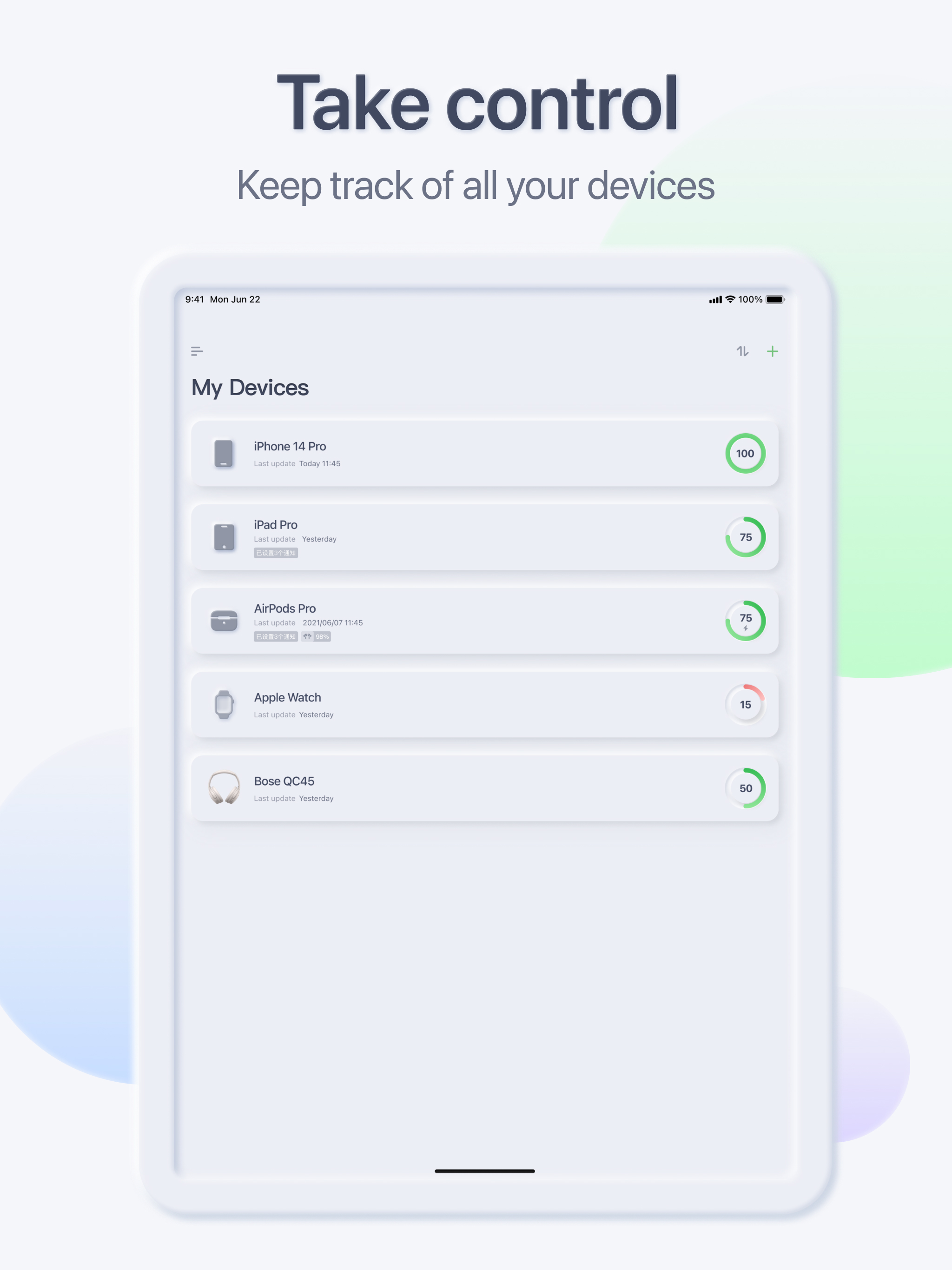
Study the product story and store experience behind the acquisition funnel.


03 / Market context
Keep revenue, downloads and store rankings separate from advertising performance.
V2.3.3 is now working! No longer having Force Sync errors in my Shortcuts on iPadOS 18.7.1! So at some point the app was fixed or Apple iOS updates fixed the Shortcuts issue!! It’s also working on iPhone, which I have also updated! Excellent App!! V2.3.1 is still failing with Force Sync errors in my Shortcuts on iPadOS 18.3.2! When running from Automation at the scheduled times, it produces: “…encounter an error: The operation couldn’t be completed (INCExtensionErrorDomain error 1307.)” When running within Shortcuts app: After long pause: “Could not run Force Sync. The operation took too long to complete. Please try again.” On my iPhone 18.3.2 running v2.1.1, Force Sync works with no issues as I haven’t updated for these 9 months! This problem started with v2.1.2, so I’ve been testing on my iPad as automations are more critical on my iPhone! Please look into this & restore functionality back in v2.1.1 I look forward to seeing this working in current versions. Thanks!! ——— Old Reviews ——- Been using this app for sometime & have used it in so many of my Shortcuts to monitor my many devices! It was great! v2.1.5 is still producing Force Sync timeout error when running in Shortcuts on iPadOS 17.6.1 v2.1.3 is still producing Force Sync error when running Shortcuts However, the last update (v2.1.2), is now causing Shortcuts to error out every time Force Sync is used! “Could not run Force Sync: The operation took too long to complete. Please try again” I needed to disable many Automations using this, please fix as soon as possible! Thanks!!
In an effort to make my devices hopefully last as long as they can, I have been trying to monitor when my iPad, Mac, iPhone and Watch have either reached 80% or dropped below 40%. This app is the best one for the job. I switched from CloudBattery and this app gives much more consistent notifications when my device reaches a specific percentage. I like the ability to use complications on Watch faces and that automation is easy to set up with a little guide even included in the app. Although not always the most accurate, I do still find it nice that we can add any bluetooth device and it’s usually decent at guesstimating the charge. The widgets for this app also give a handful of options for customization and they look very “Apple” on the Home Screen.
I tried 2 other apps, thought about paying but they just didn't impress me. This one does. There are a few small bugs to work out, I will report that to the developer, hopefully seeing a fix and making this app perfect! You can setup many portable devices and then on a desktop (like iMac) see the information for all the portable devices. I setup 2 Macbooks, 2 iPhones, apple watch and a desktop mouse. I have 1 spot on any device to see the state of all the devices. The interface looks great, very nicely done!! My Issues: 1. Lock screen iPhone Widgets should extended to allow more than 4 devices in side by side. A list already lets you show all, but the side by side is more compact. I have 5 devices, but 8 would cover just about everyone. 2. It should be documented that the free version only supports 3 devices, so you will never see more, making it look like your setup is wrong. No problem, just pay and get as many devices as you want to. But even then your old device won't show, unless you go and manually add "this device" from the app. 3. If you pick a new icon for my Macbook, that does not save properly, while changing the iphone icon does get saved after exiting and between devices. 4. After setting up my apple watch in the app, then changing the name through iPhone, that new name never makes it into the app. You end up with a stale device which will never update in the app, and you will have to manually remove the old name and add the new name. 5. For my Apple Mouse, I can add it but the system does not pickup it's name, it just calls it Magic Mouse 2, instead of the name I see on my iMac.
Never worry about dead batteries again! AllMyBatteries is your complete battery monitoring solution across all your Apple devices and Bluetooth access...
| Name | Price | Type |
|---|---|---|
| Upgrade to family plan | $5.99 | One-time |
| AllMyBatteries Ultimate | $6.99 | One-time |
| AllMyBatteries Ultimate Family | $12.99 | One-time |