Check the acquisition promise
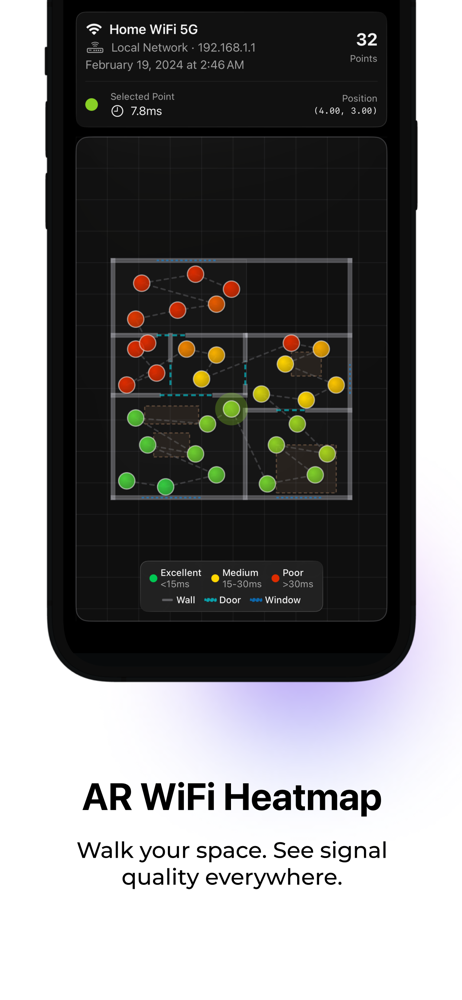
Read the store headline, screenshots and description. What problem is the app promising to solve?
Study the storefront ↗
Rastislav Cervenak · iOS
Explore the ad evidence, study the storefront, and build your next acquisition hypothesis.
01 / Creative research
Read the store headline, screenshots and description. What problem is the app promising to solve?
Study the storefront ↗Explore apps with direct store-link matches. Compare their hooks and formats without assuming the same approach works here.
Browse observed advertisers ↗Store rankings and revenue estimates describe market context. They do not establish ad spend, conversions or ROAS.
Review the market context ↗02 / Storefront & product
Study the product story and store experience behind the acquisition funnel.



03 / Market context
Keep revenue, downloads and store rankings separate from advertising performance.
The app gives you basic ping information, nothing else. The idea is good, but needs to be enhanced with more in depth detail data about your WiFi network. The AR map does not consider multiple floor levels. Finally, I hate the subscription model which is certainly being abused by developers. Developers need to get back to selling these kind of apps for a fixed price and they will most likely do better. Charge a couple Dollars for a tool, there is no justification in charging a monthly or yearly subscription for an app like this. Users must value the hard work and developers need to be compensated, but in a fair way.
First, not a big fan of the “subscribe for free demo”…hesitates but did demo and unsubscribed immediately (that revenue model creates hesitation for users). Does what is says, creates map of your house WiFi “coverage” using AR. But I don’t think a simple ping to the router is very accurate measurement method of your WiFi experience. Doesn’t even show you the name of router your measuring to in app (negative). Doesn’t allow you to see additional technical details of measurements (negative); someone who uses this will often want to understand this technical details. Nice that you can save a history (positive) but doesn’t let you name them to indicate what the map is from; like first floor, second floor, yard, etc. (negative). Maps don’t seem to be oriented to the compass; I’d expect north to always be at top of map (negative). Lots of times I got a white dot which I assume means I crossed through spot but it couldn’t take a measurement, key would be nice here (negative). Again, has potential but may not reach it based on current revenue model.
I was hoping to map out my house and see where the WiFi signs was strongest. I “subscribed” for a year to use the free trial since I am not sure if the app was going to do what I was interested in. The augmented reality feature worked really well and I walked around my house with the camera aimed down and I was turning grey dots into colored dots. Green = fast ping to router, red = slow. The results were cool in the sense I could see a rough map of my house. I could tell where I walked around the kitchen island, around dining tables and beds, which bathrooms I forgot to scan etc. Five stars there! I was expecting to uncover dead zones or rooms where it was clearly slower than others but unfortunately all of the rooms were about the same. There were some random red dots next to green dots in the same room so I considered those outliers to be ignored but there were equal amounts of outliers everywhere so it couldn’t identify any problem areas. Perhaps my house coverage is good and I shouldn’t replace my existing setup with a new mesh router…hmmmAnd for the “unsubscribe”, it was easy once I figured out how. Go to iPhone settings, go to your Apple ID, then there is a menu item for subscriptions and I canceled with a click of a button. No calling customer support or emailing needed. The other cool thing is my house scans are still visible in the app even after I’ve canceled. I’m guessing I will lose access after the three day trial is up, I just didn’t want to forget to cancel since I don’t have any other use for this now.I feel like I’d pay a dollar or two for the use I already got out of this, I just don’t want to have to “subscribe”. Why didn’t I “buy” it for one month? I wasn’t sure if the app would do what I was hoping so making that the purchase decision before using it just felt weird. There’s plenty of junk apps that don’t work at all and I was afraid this might be one.
Internet Quality helps you understand your WiFi. Rebuilt from the ground up with a stunning Liquid Glass design for iOS 26. • Real-time local networ...
| Name | Price | Type |
|---|---|---|
| 1 Month | $0.99 | Monthly |
| 12 Months | $1.99 | Yearly |
| Pro - Monthly | $4.99 | Monthly |
| Pro — Yearly | $24.99 | Yearly |
| Pro — Lifetime | $49.99 | One-time |