App Profile: Cleaner - AI CleanUp Storage
Android / Games / Puzzles
Cleaner - AI CleanUp Storage
Installs:
Rating:
4.33
Total Reviews:
12
Top Countries:
CN, TW, MX
$10k
/mo
20k
/mo
Reviews: What People Think About Cleaner - AI CleanUp Storage
About Cleaner - AI CleanUp Storage
AI Clean Master – A Cleaner Phone, More Free Space
A simple and smooth tool that helps you organize photos, remove clutter, and free up valuable storage. With smart detection, AI photo search, and voice-like command cleanup, managing your gallery has never been easier.
=== Key Features ===
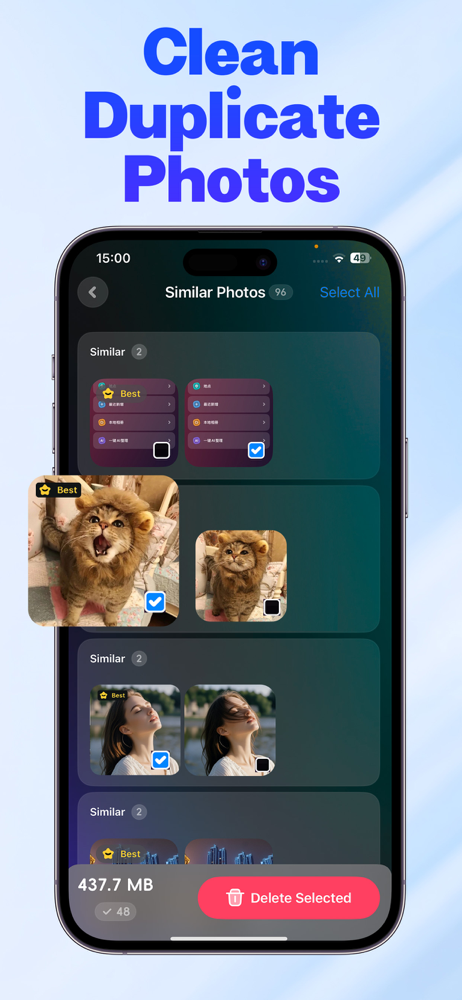
• Smart Photo Cleanup: Automatically detects duplicates, similar shots, bursts, blurry photos, and screenshots.
• AI Photo Search: Type a keyword to instantly find the photos you need.
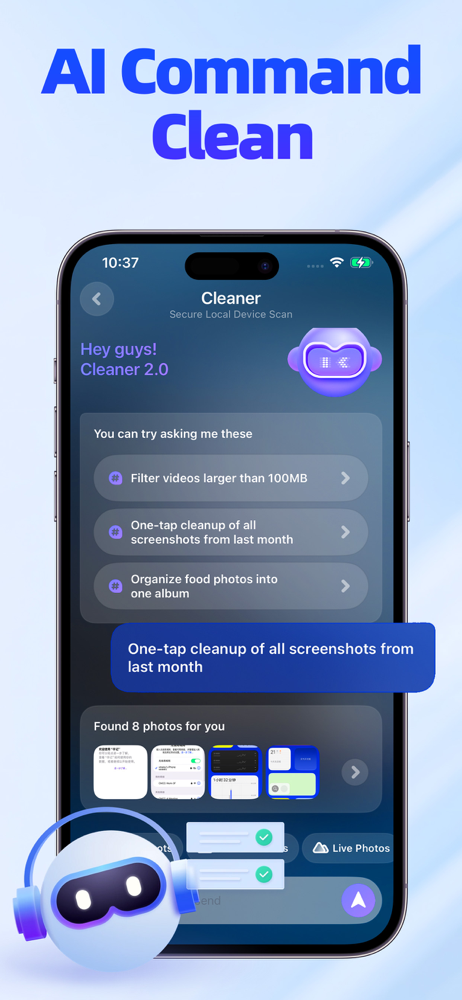
• AI One-Tap Commands: Clean with simple phrases like “Delete last week’s photos.”
• Photo & Video Compression: High-quality compression that saves major storage.
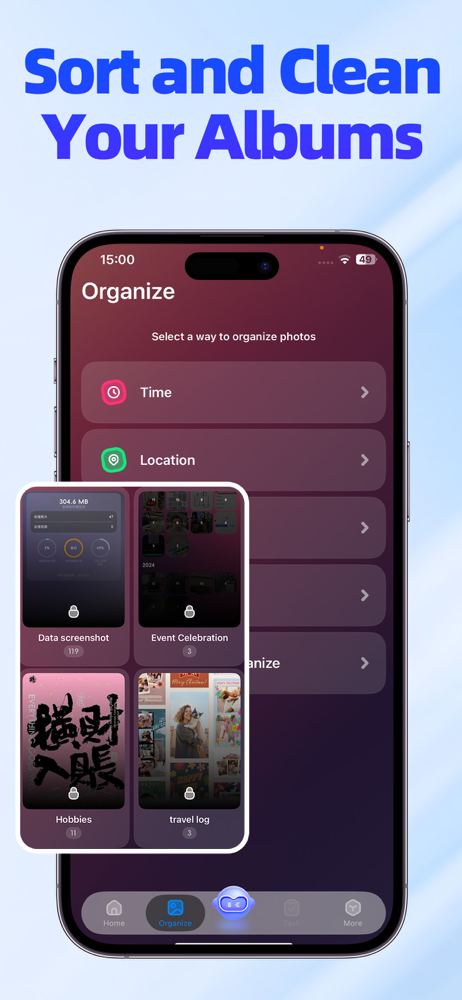
• Smart Albums: Auto-organize memories by time and location for easy browsing.
=== More Powerful Tools ===
►Quick Clean
• Swipe left or right to quickly browse photos; swipe up to delete instantly.
• Smooth interaction and fast feedback.
• Supports batch processing and rapid filtering.
►Screenshot Cleanup
• Automatically detects chat screenshots, work screenshots, system captures, and more.
• Filter out unnecessary images with one tap.
• Preview before deleting to avoid accidental removal.
►Blurry / Out-of-Focus Cleanup
• AI identifies blurry, shaky, over-exposed, and low-quality images.
• View them all in one place for fast bulk cleanup.
• Compare clarity levels to confidently decide what to delete.
►Similar Photo Cleanup
• Detects repeated compositions or multiple similar angles.
• Automatically recommends the best photo to keep.
• Remove the rest with one tap to reclaim space.
►Burst Photo Management
• Recognizes burst photo groups and lets you compare each shot manually.
• AI evaluates clarity, expressions, and details to suggest the best option.
►Video Cleanup
• Automatically detects large or lengthy videos.
• Sort by size or duration to locate the biggest storage hogs.
• Preview, delete, or compress with ease.
►Smart Albums
• Automatically groups photos by date, location, or event.
• Scroll freely within each memory collection.
• Quickly jump to a specific period or moment.
►AI Photo Search
• Search keywords like “landscape,” “selfie,” or “documents.”
• Instantly pinpoint specific content in massive albums.
• Faster and more accurate than manual browsing.
►AI Command Cleanup
• Manage your gallery with simple text commands like: “Delete blurry photos”“Clean photos from last month”.
Who Is This For
• Users who often run out of phone storage
• Heavy photo takers with thousands of images
• Users with too many screenshots or duplicates
• People who love capturing daily life and need organized albums
• Anyone wanting a cleaner, smoother-running iPhone
Perfect For These Situations
• “Storage Almost Full” alerts
• Trips that produce tons of similar and burst photos
• Work screenshots piling up
• Quickly locating receipts, documents, selfies, or specific categories
• Releasing space urgently for app downloads or video recording
Subscription Information
• Payment will be charged to your iTunes account at confirmation of purchase.
• Subscriptions automatically renew unless turned off at least 24 hours before the end of the current period.
• You can manage or turn off auto-renewal in Settings → Apple ID → Subscriptions.
• A free trial is available. After the trial ends, the subscription renews automatically unless canceled in advance.
Privacy Policy: http://zhineng.taozantek.com/privacy.html
User Agreement: http://zhineng.taozantek.com/agreement.html
A simple and smooth tool that helps you organize photos, remove clutter, and free up valuable storage. With smart detection, AI photo search, and voice-like command cleanup, managing your gallery has never been easier.
=== Key Features ===
• Smart Photo Cleanup: Automatically detects duplicates, similar shots, bursts, blurry photos, and screenshots.
• AI Photo Search: Type a keyword to instantly find the photos you need.
• AI One-Tap Commands: Clean with simple phrases like “Delete last week’s photos.”
• Photo & Video Compression: High-quality compression that saves major storage.
• Smart Albums: Auto-organize memories by time and location for easy browsing.
=== More Powerful Tools ===
►Quick Clean
• Swipe left or right to quickly browse photos; swipe up to delete instantly.
• Smooth interaction and fast feedback.
• Supports batch processing and rapid filtering.
►Screenshot Cleanup
• Automatically detects chat screenshots, work screenshots, system captures, and more.
• Filter out unnecessary images with one tap.
• Preview before deleting to avoid accidental removal.
►Blurry / Out-of-Focus Cleanup
• AI identifies blurry, shaky, over-exposed, and low-quality images.
• View them all in one place for fast bulk cleanup.
• Compare clarity levels to confidently decide what to delete.
►Similar Photo Cleanup
• Detects repeated compositions or multiple similar angles.
• Automatically recommends the best photo to keep.
• Remove the rest with one tap to reclaim space.
►Burst Photo Management
• Recognizes burst photo groups and lets you compare each shot manually.
• AI evaluates clarity, expressions, and details to suggest the best option.
►Video Cleanup
• Automatically detects large or lengthy videos.
• Sort by size or duration to locate the biggest storage hogs.
• Preview, delete, or compress with ease.
►Smart Albums
• Automatically groups photos by date, location, or event.
• Scroll freely within each memory collection.
• Quickly jump to a specific period or moment.
►AI Photo Search
• Search keywords like “landscape,” “selfie,” or “documents.”
• Instantly pinpoint specific content in massive albums.
• Faster and more accurate than manual browsing.
►AI Command Cleanup
• Manage your gallery with simple text commands like: “Delete blurry photos”“Clean photos from last month”.
Who Is This For
• Users who often run out of phone storage
• Heavy photo takers with thousands of images
• Users with too many screenshots or duplicates
• People who love capturing daily life and need organized albums
• Anyone wanting a cleaner, smoother-running iPhone
Perfect For These Situations
• “Storage Almost Full” alerts
• Trips that produce tons of similar and burst photos
• Work screenshots piling up
• Quickly locating receipts, documents, selfies, or specific categories
• Releasing space urgently for app downloads or video recording
Subscription Information
• Payment will be charged to your iTunes account at confirmation of purchase.
• Subscriptions automatically renew unless turned off at least 24 hours before the end of the current period.
• You can manage or turn off auto-renewal in Settings → Apple ID → Subscriptions.
• A free trial is available. After the trial ends, the subscription renews automatically unless canceled in advance.
Privacy Policy: http://zhineng.taozantek.com/privacy.html
User Agreement: http://zhineng.taozantek.com/agreement.html
File size: 36596736
Launched countries: BHCYMTBOKHEELVNIPYMZYEBJBFCGJOLAMLSNTZUGZW
Minimum OS version: 17.0
Release Date: 1568218989000
Published by Tz Tech Co., Ltd.
Website url:
Publisher country: China