
Check the acquisition promise
Read the store headline, screenshots and description. What problem is the app promising to solve?
Study the storefront ↗
葆霖 李 · iOS
Explore the ad evidence, study the storefront, and build your next acquisition hypothesis.
01 / Creative research
Read the store headline, screenshots and description. What problem is the app promising to solve?
Study the storefront ↗Explore apps with direct store-link matches. Compare their hooks and formats without assuming the same approach works here.
Browse observed advertisers ↗Store rankings and revenue estimates describe market context. They do not establish ad spend, conversions or ROAS.
Review the market context ↗02 / Storefront & product
Study the product story and store experience behind the acquisition funnel.


03 / Market context
Keep revenue, downloads and store rankings separate from advertising performance.
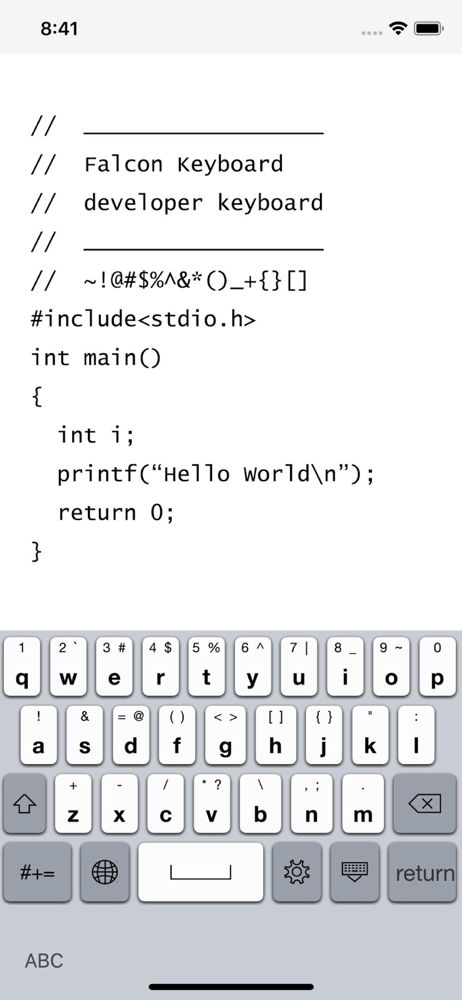
I'm typing this review wiith the keyboard on my iPhone 12 Mini running iOS 15. Here is the user manual you need: - To access the symbols you drag. Example: < is typed by dragging down and right from g. \ is directly down from b. - The shift key is actually caps lock. To type a single capital letter, drag off and back on to the letter. - I prefer a much smaller height. This can be customized in the settings, which are accessible from the gear icon on the keyboard itself. My problems with the keybord and why it doesn't get 5 stars from me: - The keys on the edge should have a hit area all the way to the edge. I consistently miss backspace because I am pressing too close to the edge of the screen. - The globe icon should be removed now, since it’s built into the bottom of the keyboard on newer iOS devices. - The setting page should be in the app and not a dedicated button. I consistently press the gear while intending to type space. - This keyboard doesn’t cause the screen to scroll when typing for some reason. - It doesn’t work in some apps like Prompt (it’s not in the list of keyboards in these apps). All in all, this is definitely better for programming than the built in keyboard, but it could use improvement.
Could not access the charcters on the top row of keys. Long press and shift DO NOT WORK. I bought this keyboard for easy access to those characters. I am a developer, needless to say I am disappointed.
This looks like it could be a good app but I don't know how to get to the extra keys above the letters...long pressing does not work neither does circling around the letter...NOTHING😭 Long pressing a letter and moving down will make that letter uppercase. I will update review when i figure it out. I tried app support but I could not contact the developer because I could not understand the language
Falcon Keyboard for iPhone, iPad and iPod touch is a integrated keyboard for you, replacing your device’s built-in keyboard with one that can easy typ...


