Check the acquisition promise
Read the store headline, screenshots and description. What problem is the app promising to solve?
Study the storefront ↗
Shenzhen Huaptec Co., Ltd · iOS
Explore the ad evidence, study the storefront, and build your next acquisition hypothesis.
01 / Creative research
Read the store headline, screenshots and description. What problem is the app promising to solve?
Study the storefront ↗Explore apps with direct store-link matches. Compare their hooks and formats without assuming the same approach works here.
Browse observed advertisers ↗Store rankings and revenue estimates describe market context. They do not establish ad spend, conversions or ROAS.
Review the market context ↗02 / Storefront & product
Study the product story and store experience behind the acquisition funnel.




03 / Market context
Keep revenue, downloads and store rankings separate from advertising performance.
I was barely able to see the app because the color contrast are so terrible. They have light gray on a slightly darker gray background, making it almost impossible to read. Then the app itself wasn't reading any of the signals in the bands from the booster, even after connecting and registering it over Wi-Fi. Now the tech support I'm getting is painfully slow because they only want to text and this is wasting an entire workday to set up.
I was in dismay and highly frustrated by the frequency of external antenna strength updates. It made installation a nightmare. I ended up having to enlist additional help when on site performing the installation, which was embarrassing when the app was supposed to work in this capacity. It simply does not work. Updates do not happen frequently enough compared to the LCD screen of the unit itself. PLEASE fix this. We need AT LEAST 1 second update intervals, otherwise this doesn’t work. We need a constant visualization and a graph would also be helpful to see an easy reference record of when we’re moving it. In my case I was installing in a -1 to -9 dB service area and every bit of strength counted and required some “micro adjustments” and this app just does NOT work, especially when you’re up in the air 20 feet and the unit is inside of the building below you and you have to try to use a walkie talkie to relay signal strength! Additionally, after installation it is not at all reliable in reporting signal strength. I am now getting -12dB being reported remotely (it was reporting -4 regularly), but on the LCD it is still moving around at -6 to -1 dB and so there is a connection and the device is working well, but the app is just garbage.
If you’re somewhat intelligent you can figure this thing out. It pumps out 4 different radio frequencies so the best thing to do in my situation is turn off the signals that aren’t performing well. And make sure your antenna is pointed/installed in the best possible spot. It’ll show less bars when turning off the other signals, but I have lightning speed with 1-2 bars, and have zero service with full bars and lte. Just use your brain and troubleshoot and this thing will do the trick for you. Don’t be dumb then jump on here to insult it because you’re not capable/smart enough. Rant over
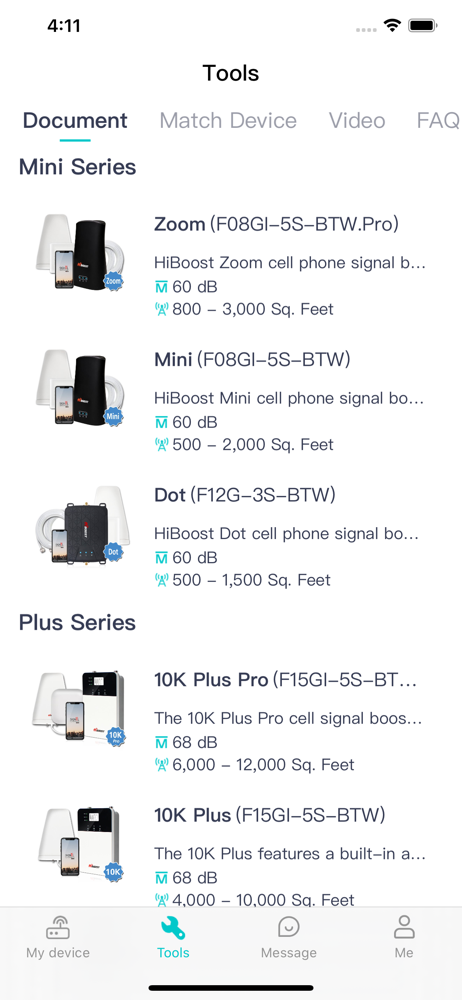
Signal Supervisor is a new App from HiBoost to help you monitor your HiBoost/SuperBars/Zorida cell phone signal boosters. Used in conjunction with our...