Check the acquisition promise
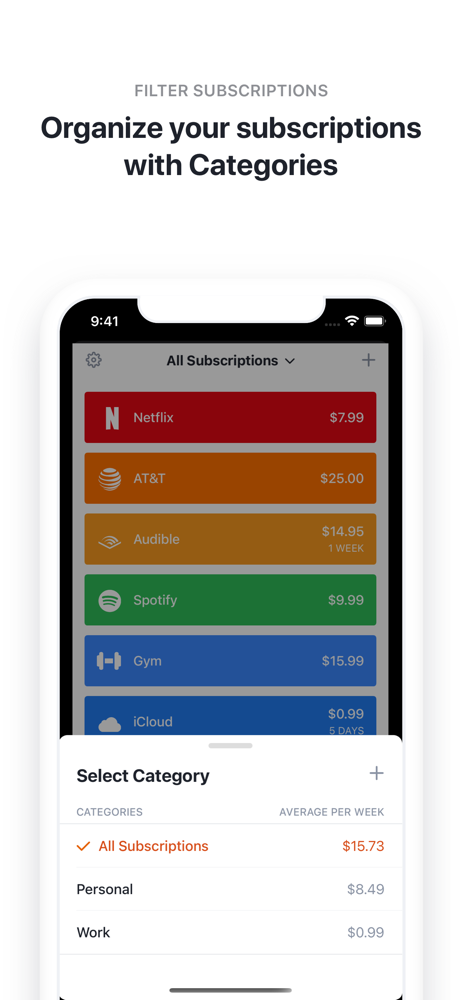
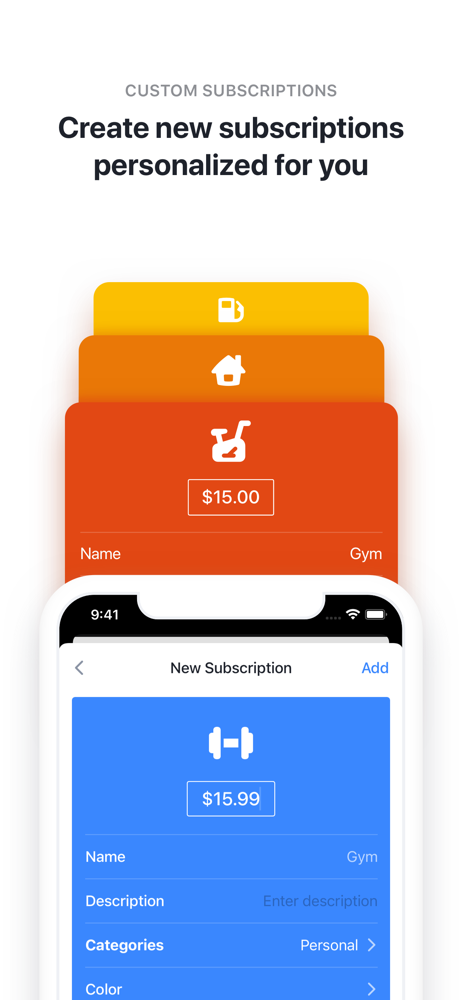
Read the store headline, screenshots and description. What problem is the app promising to solve?
Study the storefront ↗
Yummygum · iOS
Explore the ad evidence, study the storefront, and build your next acquisition hypothesis.
01 / Creative research
Read the store headline, screenshots and description. What problem is the app promising to solve?
Study the storefront ↗Explore apps with direct store-link matches. Compare their hooks and formats without assuming the same approach works here.
Browse observed advertisers ↗Store rankings and revenue estimates describe market context. They do not establish ad spend, conversions or ROAS.
Review the market context ↗02 / Storefront & product
Study the product story and store experience behind the acquisition funnel.



03 / Market context
Keep revenue, downloads and store rankings separate from advertising performance.
Just downloaded this recently and it looks like a great app that will do something valuable for me that most budgeting/personal finance apps don’t do, or don’t do well — track ongoing expenses such as subscriptions. We all know these are becoming a bigger part of life. I love the fact this app isn’t subscription based itself! At least I don’t think it is. The premium features seem quite reasonably priced. Just one big drawback for me. Why don’t you make an iPad version? It’s not hard and it would be a big selling point. Well it would for me; I’m disabled and in bed most of the time so I use an iPad Pro M1 12.9” rather than my dinky iPhone XS Max (heh). Those of us who aren’t “on the go” really want and need the extra screen size of a tablet or a laptop. I have my phone on my bedside table for, you know, phone stuff. I’m not taking away any stars because I want to encourage people to download your product and for you guys to keep having success. But please think about taking the app multi platform, at least to iPadOS. macOS would be great too, and have them all sync via iCloud for a given Apple ID and account (if it supports multiple accounts per user). Thanks!
Subscriptions, am I right? $1.99 here, $9.99 there, “the price of a cup of coffee.” Monthly, Yearly, “Lifetime.” Note taking apps, to-do apps, habit trackers, sleep trackers, health trackers, lifting and running and yoga apps, photo editors, budget trackers, educational apps, and on and on and on, not to mention streaming subscriptions and the usual bills. Everyone wants to gouge a little of your money away because what’s a few dollars here and there? No big deal, right? Bobby clearly showed me it _is_ a big deal. If nothing else this app encouraged me to investigate where my money goes, and now presents that information in 3 ways, all visible from their main, and thankfully only, information page: What am I subscribed to? When is the next payment due? And how much am I paying overall for these subscriptions? A huge benefit in my mind is this is Bobby’s sole function - this information isn’t buried in a budgeting app, it’s not based on if I categorise it as entertainment or bills (though one could organize those functions by colour for sure), and I don’t have to look at a wheel of my “spending trends.” I open the app, and it’s all there, with no other tabs or windows to worry about. The only other thing I could want is more icon options when making custom subscriptions, but that’s a very, very small dent in my satisfaction with this app. Simple, beautifully designed, and gets the information across fast. Love it, and definitely recommend it!
Bobby 2 is a clean, slick, simple way to keep track of all of your subscriptions. At a time when so many developers are switching to subscription models, it can be tough to keep each subscription’s cost and renewal dates straight. Having a simple-yet-beautiful place to go to view all of these is a bigger boon than you might think. The ability to show expense total by total or average for a monthly period, and the manual or automatic sorting options make it easy to quickly see what’s due soon or view your subscriptions how you need or want. The payment cycles when adding a subscription are completely customizable so whether that subscription renews every month, or every 4 weeks, your covered. Bobby 2 includes a lot of popular subscriptions already, from which you can add (Apple Music, Netflix, Dreamhost, even Ulysses and Overcast), and adding these will include the app/service icon. For other services, you can create a custom subscription entry with all of the same features, and then choose from a set of good looking icons, and the color picker. I was able to make my entry for Day One Premium match the shade of blue commonly used by Day One (more or less) and give it an icon close enough to represent what it’s for, and I was pretty satisfied with that. The app also offers a few icon selections for the home screen Icon, light and dark modes, and the ability to select from a few different fonts. While these, along with unlimited subscriptions, are behind an in-app purchase, the price is well worth it — especially at the current $1.99, but even at the regular $3, it would be worth it if you have a lot of subscriptions to keep track of. Definitely download it and give it a try at least, since it’s free to do so, but I highly recommend Bobby 2!
Bobby is the easiest way to get insights in your fixed costs. Manage your subscriptions and get notified when a bill is due. EASILY ADD SUBSCRIPTION...
| Name | Price | Type |
|---|---|---|
| Security Pack | $0.99 | One-time |
| Unlock Category Limit | $0.99 | One-time |
| Visual Pack | $0.99 | One-time |
| Unlock Subscription Limit | $0.99 | One-time |
| All-in-one Pack | $1.99 | One-time |
| All-in-one Pack v2 | $2.99 | One-time |