Check the acquisition promise
Read the store headline, screenshots and description. What problem is the app promising to solve?
Study the storefront ↗
Mohit Bodar · iOS
Explore the ad evidence, study the storefront, and build your next acquisition hypothesis.
01 / Creative research
Read the store headline, screenshots and description. What problem is the app promising to solve?
Study the storefront ↗Explore apps with direct store-link matches. Compare their hooks and formats without assuming the same approach works here.
Browse observed advertisers ↗Store rankings and revenue estimates describe market context. They do not establish ad spend, conversions or ROAS.
Review the market context ↗02 / Storefront & product
Study the product story and store experience behind the acquisition funnel.


03 / Market context
Keep revenue, downloads and store rankings separate from advertising performance.
Where can you change the units?
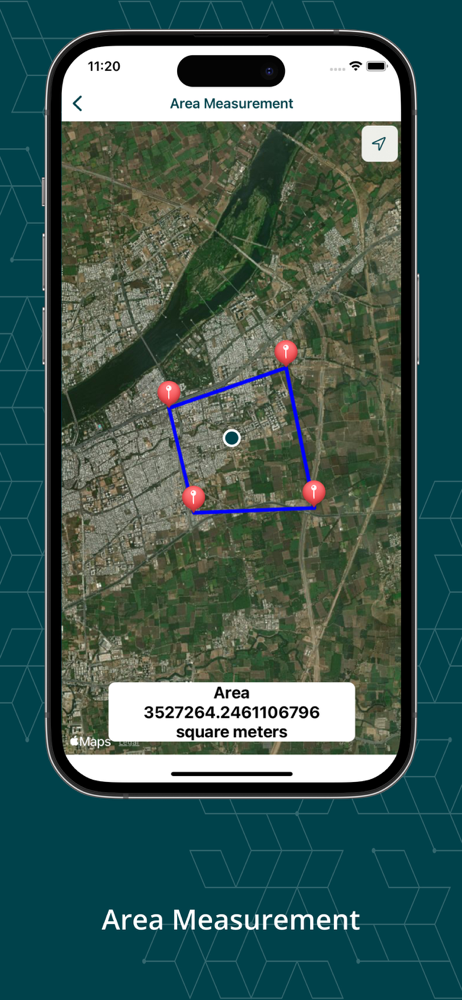
Here are my observations from trying the app: 1 Zooming into a place is very tedious, having to pinch out many times repeatedly to get the closest view. Double tapping to zoom in is much faster, but it places a red measuring point on the map while I am doing that. 2 It’s hard to place a measuring point precisely, using a finger. I cannot find a way to move the point, once it has been placed. I’d like to be able to be able to press and hold on the point, and drag it to correct the position. 3 I would like to be able to delete points that are placed incorrectly. I cannot figure out a way to do that, without starting over. 4 I can place only 4 points, and no more. Irregularly shaped areas require a lot more than 4 points. 5 The area measurements are in square meters. I would like to have the results in square feet. An option in Settings would allow the user to choose meters or feet.
This is an absolutely wonderful app—with two issues that need to be addressed. 1) Unless I’m missing something, there is no way to choose between metric and imperial measurements. 2) All distance measurements appear to be based on the shortest route, so it is not possible to compare alternate routes. Even with these two shortcomings, I am extremely impressed by the utility of the app.
All Area Measurement 2024 is a smart tool for measuring areas on the map. Once you place your points on the map and then calculate area between all po...
| Name | Price | Type |
|---|---|---|
| All access (Weekly) | $2.99 | Weekly |
| All access (Monthly) | $9.99 | Monthly |
| Lifetime Access | $12.99 | One-time |
| All access (Annual) | $19.99 | Yearly |
| All access (Annual) | $29.99 | Yearly |