Check the acquisition promise
Read the store headline, screenshots and description. What problem is the app promising to solve?
Study the storefront ↗
Junfei Peng · iOS
Explore the ad evidence, study the storefront, and build your next acquisition hypothesis.
01 / Creative research
Read the store headline, screenshots and description. What problem is the app promising to solve?
Study the storefront ↗Explore apps with direct store-link matches. Compare their hooks and formats without assuming the same approach works here.
Browse observed advertisers ↗Store rankings and revenue estimates describe market context. They do not establish ad spend, conversions or ROAS.
Review the market context ↗02 / Storefront & product
Study the product story and store experience behind the acquisition funnel.



03 / Market context
Keep revenue, downloads and store rankings separate from advertising performance.
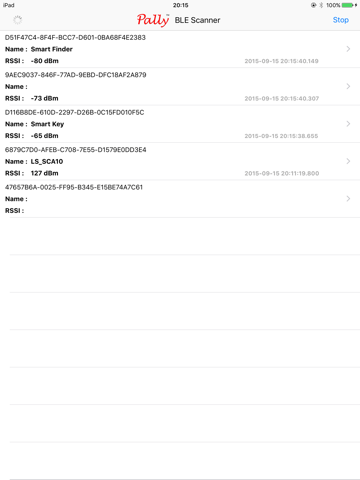
I lost my pencil two days ago just in my house, and I’ve been going crazy trying to find it. I tried using this app, and although I get the numbers, it’s so confusing trying to figure out which one of the signals it’s getting is what I’m looking for. I’ve been around all the rooms I’d been hanging around that day and some other random places, but the signals never indicate that I’m getting close (they just stay in the -80 to -90 range). It’s possible that the pencil died, which I guess this app wouldn’t be able to locate, but when I tested it on my bluetooth speaker (on and charged), nothing came up. Like, no new devices found, and all of the shown signals indicate that I’m pretty far away from all of them. If I’m doing something wrong, please tell me! I just wanna find my stuff :(((
Love it! Thank you sooo much developers of this app! I lost my Fitbit last night at school. I had it in my back pocket, so I feared that it was lost at school, maybe in the bathroom. I *hoped* it would be in my car or at home somewhere. I downloaded this and figured out which set of numbers/letters (as noted in other comments) it must have been by which one was moving up and down the most drastically when I moved around the house. For example, the Bluetooth speakers I have downstairs stayed relatively at the same strength as I moved around upstairs. I moved from room to room, literally holding my phone an inch above the floor, until I spotted it. If you’ve seen a Fitbit tracker, you know how small these things are!! I found it under my bed—never would have looked there. It must have flown out when I took off my pants when I got home last night. Anyways, so glad I didn’t lose it. This app is awesome!
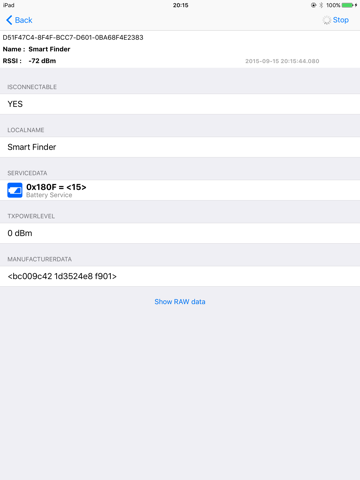
Like other reviewers have said, this app needs instructions. After reading other reviews and using it to try and find a Fitbit, I have gathered that most devices have meaningless names within the app. The RSSI is a signal strength measurement. They are negative numbers, so note that higher numbers will appear smaller. In my experience the signal strength hovered between -99 and -85 until you got within 10 feet of the object. Remember that the signal goes right through the floor and that there will be "pockets" of increased signal strength due to the interaction between the signal and metallic objects within the house (or the walls) that can make it misleading at times to use it as a tool for finding a lost Bluetooth device. When the signal got up to -60 I knew I was pretty close - I was within 3 feet. It rose above -50 when I was around one foot away. So in short it fluctuates around a lot until you're pretty close, but -60ish meant I was on the right trail!! Good luck with your search!
Bluetooth Smart Scanner is the fastest app to find all Bluetooth Low Energy (also known as Bluetooth 4.0 or Bluetooth Smart) devices around you. It s...