Check the acquisition promise
Read the store headline, screenshots and description. What problem is the app promising to solve?
Study the storefront ↗
Yukiko Iwai · iOS
Explore the ad evidence, study the storefront, and build your next acquisition hypothesis.
01 / Creative research
Read the store headline, screenshots and description. What problem is the app promising to solve?
Study the storefront ↗Explore apps with direct store-link matches. Compare their hooks and formats without assuming the same approach works here.
Browse observed advertisers ↗Store rankings and revenue estimates describe market context. They do not establish ad spend, conversions or ROAS.
Review the market context ↗02 / Storefront & product
Study the product story and store experience behind the acquisition funnel.


03 / Market context
Keep revenue, downloads and store rankings separate from advertising performance.
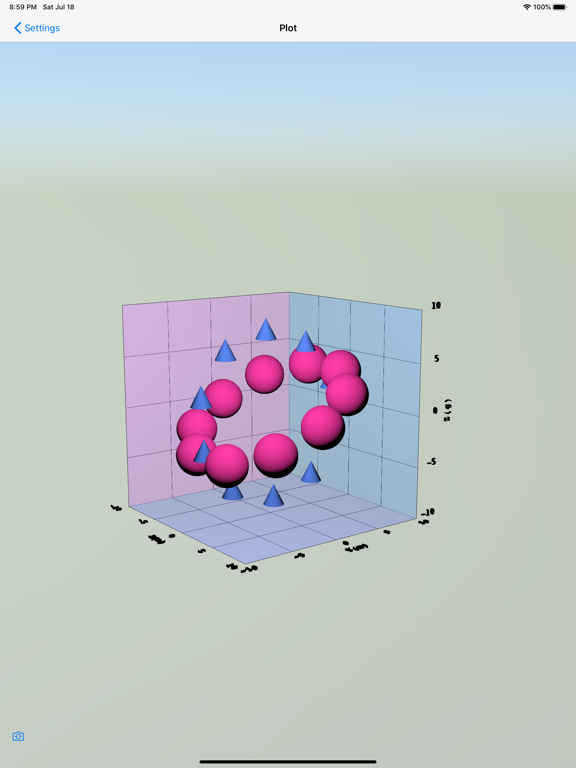
not a scam like another reviewer said, but you have to first prep your data into a CSV file outside this app with x,y,z columns (or maybe w 4th dimension also now is supported) then open the CSV file with standard TextEdit app. then use File / Share in TextEdit to share the file to this app 3D Plot * (whatever it is called). the share-to this new app doesnt show up initially, you have to go thru the circle-3-dot menu in Text Edit share to add it as a shareable destination. this is similar to how iMovie works, you share Out of iMovie when you want to publish your movie. it is a little strange but works. i think this convoluted way of data import may be due to macos app sandboxing requirements. then the data appears as a data set in the app on the left side in a list above the default data sets. then you click the round radio button next to the new data set to plot it. now in the app, what it needs minimally is: ability to control dot / sphere size (ok i found this! it is the info button next to the sphere size in the UI). ability to set the scale of each of XYZ axis independently. ability to shut off axis notations. maybe that is there but i havent found it yet. [ok now i did find the axis scale but it only allows control by order of magnitude, needs finer control] it would be good to have a surface and/or wireframe and/or color contour display option also instead of dots, as with dots it is sometimes hard to visualize the overall shape. but the other reviewer is correct, i had to purchase the upgrade to allow more than 10 points. well i did purchase it. but it still didnt solve my problem immediately due to the above limitations. however it is almost there. keep developing this app, we need easy 3d data plotting... other needed features: ability to shut off 3d perspective effect, just go orthogonal ability switch view to "along specified axis" (e.g. make any of the 3 axes be normal to the screen)
I got 3D Data Plot from the App store. My first shock was that there are no menu bar items other than About, Hide and Quit. No File, Open, Preferences, Save, Updates, or Help. The app comes pre-installed with three sample data sets. These show promise in that they can be manipulated in ways that one would expect. The big problem is that there seems to be no way to import data from a file. The App Store video shows a window magically popping up to fetch data, but after viewing it a dozen times, I still do not see how to get this window to appear. The App Store description says to "tap 'share button'", but no such button exists in the iMac app. Under settings, I noticed that the free app only allows ten data points. For an in-app purchase of $7.99 you can enable more points (actual number not specified). I decided that the file reading might be opened up if the purchase was made, but the app does not behave any differently after I threw away $7.99 plus tax. The program has created a folder on my iCloud Drive called 3dDataPlot. It holds an empty file called sample.txt. I do not have privilages over this folder, and cannot copy a data file into it. Clicking "App Support" in the App Store brings up a webpage that is not in English, with the heading 雁来十番地 / Kariki No.10 I don't think that this webpage has anything to do with the author, Yukiko Iwai. I suggest extreme caution when considering this app.
1. Measurement data (CSV file) can be plotted in 3D. • Interprets delimiters other than commas: tab(\t), space(\s) and so on. • Imports the 4th eleme...
| Name | Price | Type |
|---|---|---|
| Increase Size Limit | $7.99 | One-time |