App Profile: Pain Tracker & Diary
Android / Games / Puzzles
Pain Tracker & Diary
Installs:
Rating:
4.27
Total Reviews:
33
Top Countries:
US, GB, AU
< $5k
/mo
< 5k
/mo
Reviews: What People Think About Pain Tracker & Diary
ambamberley
Rating: 4/5
The button to add a pain layer often stops working and I have to force close the app and then I am forced to start over. It would be great to have this issue fixed, but also to have an option to edit a pain entry after its “done”. Since editing isn’t possible, I have to start over if the button stops working. I love the concept of this app but for a paid app this is a basic functionality really needs to be fixed.
-nonni 7
Rating: 5/5
This is a must have app if you have RSD/CRPS or just chronic pain. This app has so many custom types to draw on your unisex body front and back. You can give each pain type a number and a range and there’s a place for charting anything notes you’d like your doctor to have. Best feature you can download it and print this beautifully illustrated charts out and bring them with you to your appointment or you can email them to your physician. It’s a total game changer for your treatment plan. My physician was able to tweak my plan and I have my life back. I’m so blessed to my pain controlled better. Give it a try it’s worth it.
CJ from Minnesota
Rating: 5/5
I developed CRPS over the last year which causes severe neuropathic pain. My pain fluctuates day to day and sometimes it’s hard to describe it. I found this app mentioned on a pain management blog and purchased it. It has been so helpful for me in documenting where my pain is located, kind of pain and intensity. I really like that the pain types are described. My physician was pleasantly surprised when he asked me about my pain, I was able to show my documentation of its progression on this app. Along with my other records, this app helped him to put together a pain management plan based on my individual need.
About Pain Tracker & Diary
WHY DID WE MAKE THIS?
You hurt. Your pain is chronic and complicated. You can’t remember everything. You want your doctors to understand, but you don’t know how to explain what you feel.
PAIN IS LIFE-CHANGING. HELP IS HERE.
Nanolume® developed the Pain Tracker & Diary to help you record the daily textures, intensities, and locations of what you feel, so you and your care team can better understand what you are suffering with and follow how your pain responds to medications and treatments.
TRACK IT BETTER. TREAT IT BETTER.
Pain is a complex experience. It often includes multiple pain types (layers), each with its own unique texture, intensity, location, and surface area.
By keeping a diary that keeps a record of complex information, you can show your doctors what you are feeing to help them make a better diagnosis, choose more appropriate medications and treatments, and monitor if your treatments are helping. In addition, by keeping such an detailed record, trends might emerge that would otherwise go unnoticed.
PAIN IS DIFFERENT.
Pain is a subjective (not objective) sensation that can't be measured. Its assessment relies on each person’s ability to communicate what they feel. Nanolume® developed this digital diary to help you record and remember what you feel every day.
INCLUDED FEATURES.
Create a "Diary Entry":
• Choose a Pain Type. Press "+" (top-right corner of Entries/Charts screen). Read the pain types listed on the menu or create a custom pain type. Tap the icon of the pain type you feel is most intense (you can come back to add another pain type to this entry before you tap "Done").
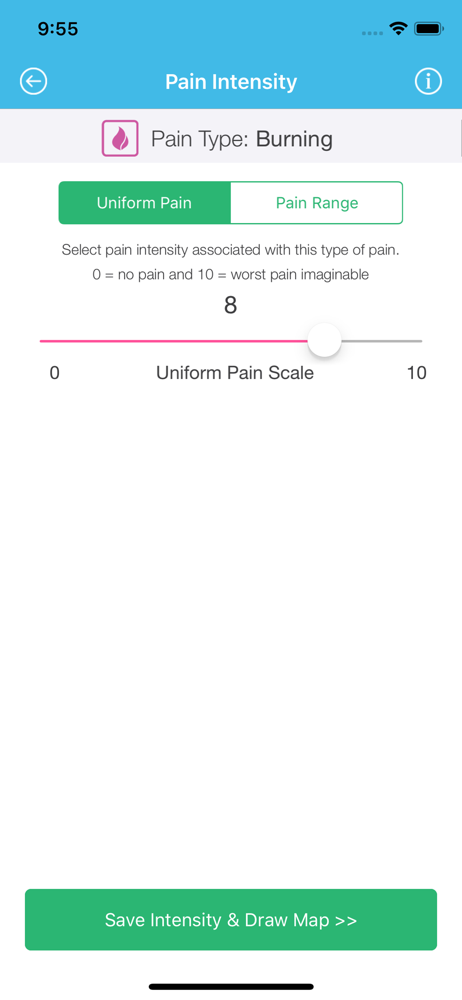
• Select the Intensity. Select the numeric intensity of the pain type you selected.
• Draw an Outline. Use your finger to draw an “outline” of the pain type you selected on the front and/or back sides of a generalized body map.
• Calculated Surface Areas. The app displays the % of body surface affected by each of the pain types drawn or shows the total % of body surface feeling pain.
• Zoom. Need to see a larger image of your hand or foot? Double-tap: "once" to zoom x2; "twice" to zoom x4; "a third time" to restore the image to its original size. We also offer pinch-to-zoom.
• Notes. Tap the “Notepad” in the top-left corner of each diary entry to record any details of your medications or treatment results.
• Tap "Add Pain." You can draw more than one pain type in each entry.
• Save Your Diary Entry. Tap "Done" to create a snapshot of all the pain type layers you need to draw in each entry. The app records the date/time each entry was saved.
• Open a Saved Entry. Tap on the date/time of the entry you want to review. Look at the intensity, location, and surface area of each distinct pain type you experienced (by touching the icon of the pain type you want to see) or see all the pain types at once and see how they overlap (tap the "All Layers" icon). Swipe the picture left or right to check how your other saved pain entries compare over time.
• Charts. View a summary of your data in "Charts."
• Forget to Save an Entry? Go back and recreate a "pain picture" from the past; then, use the "Calendar" icon to backdate the recreated entry.
• Calendar Backdating. Touch the "Calendar" icon to backdate any pain-picture you draw to create a record of what you remember from the past.
• Copy/Edit. Copy or edit a copy of a previous entry.
• CSV Export. Email or save a numeric file of your data; open that data in a spreadsheet.
• Interactive Summary & Animation. Play an animation of your data to see how each or all of your pain types change within the time period you choose by selecting the corresponding start/stop dates.
• PDF Export. Save or share your drawings, charts, notes.
PRIVACY IS IMPORTANT.
Your data is stored on your device and not collected or stored by Nanolume® LLC. Read our End-User License Agreement and Privacy Policy at www.nanolume.com.
Copyright © 2014-2023, Nanolume® LLC. All rights reserved. U.S. Patent No. 11,363,985 B2.
You hurt. Your pain is chronic and complicated. You can’t remember everything. You want your doctors to understand, but you don’t know how to explain what you feel.
PAIN IS LIFE-CHANGING. HELP IS HERE.
Nanolume® developed the Pain Tracker & Diary to help you record the daily textures, intensities, and locations of what you feel, so you and your care team can better understand what you are suffering with and follow how your pain responds to medications and treatments.
TRACK IT BETTER. TREAT IT BETTER.
Pain is a complex experience. It often includes multiple pain types (layers), each with its own unique texture, intensity, location, and surface area.
By keeping a diary that keeps a record of complex information, you can show your doctors what you are feeing to help them make a better diagnosis, choose more appropriate medications and treatments, and monitor if your treatments are helping. In addition, by keeping such an detailed record, trends might emerge that would otherwise go unnoticed.
PAIN IS DIFFERENT.
Pain is a subjective (not objective) sensation that can't be measured. Its assessment relies on each person’s ability to communicate what they feel. Nanolume® developed this digital diary to help you record and remember what you feel every day.
INCLUDED FEATURES.
Create a "Diary Entry":
• Choose a Pain Type. Press "+" (top-right corner of Entries/Charts screen). Read the pain types listed on the menu or create a custom pain type. Tap the icon of the pain type you feel is most intense (you can come back to add another pain type to this entry before you tap "Done").
• Select the Intensity. Select the numeric intensity of the pain type you selected.
• Draw an Outline. Use your finger to draw an “outline” of the pain type you selected on the front and/or back sides of a generalized body map.
• Calculated Surface Areas. The app displays the % of body surface affected by each of the pain types drawn or shows the total % of body surface feeling pain.
• Zoom. Need to see a larger image of your hand or foot? Double-tap: "once" to zoom x2; "twice" to zoom x4; "a third time" to restore the image to its original size. We also offer pinch-to-zoom.
• Notes. Tap the “Notepad” in the top-left corner of each diary entry to record any details of your medications or treatment results.
• Tap "Add Pain." You can draw more than one pain type in each entry.
• Save Your Diary Entry. Tap "Done" to create a snapshot of all the pain type layers you need to draw in each entry. The app records the date/time each entry was saved.
• Open a Saved Entry. Tap on the date/time of the entry you want to review. Look at the intensity, location, and surface area of each distinct pain type you experienced (by touching the icon of the pain type you want to see) or see all the pain types at once and see how they overlap (tap the "All Layers" icon). Swipe the picture left or right to check how your other saved pain entries compare over time.
• Charts. View a summary of your data in "Charts."
• Forget to Save an Entry? Go back and recreate a "pain picture" from the past; then, use the "Calendar" icon to backdate the recreated entry.
• Calendar Backdating. Touch the "Calendar" icon to backdate any pain-picture you draw to create a record of what you remember from the past.
• Copy/Edit. Copy or edit a copy of a previous entry.
• CSV Export. Email or save a numeric file of your data; open that data in a spreadsheet.
• Interactive Summary & Animation. Play an animation of your data to see how each or all of your pain types change within the time period you choose by selecting the corresponding start/stop dates.
• PDF Export. Save or share your drawings, charts, notes.
PRIVACY IS IMPORTANT.
Your data is stored on your device and not collected or stored by Nanolume® LLC. Read our End-User License Agreement and Privacy Policy at www.nanolume.com.
Copyright © 2014-2023, Nanolume® LLC. All rights reserved. U.S. Patent No. 11,363,985 B2.
File size: 171705344
Launched countries: USAUGBITATCZDKFIIELUNOPLPTSKESSECH
Minimum OS version: 10.0
Release Date: 1411167004000
Published by Nanolume, LLC
Website url: http://www.nanolume.com
Publisher country: US